Blog

  • What’s New in n8n 2.0? – Technical Deep Dive

    What’s New in n8n 2.0? – Technical Deep Dive

    n8n 2.0 marks a major evolution in workflow automation, bringing performance, scalability, and developer-centric improvements. Hiren8nDevelopersThis release focuses heavily on enterprise readiness, cleaner architecture, and better control for developers building complex automations.

    Whether you’re an automation engineer, backend developer, or DevOps professional, n8n 2.0 introduces meaningful changes that directly impact how workflows are built, deployed, and maintained.

    Major Architecture Improvements in n8n 2.0

    One of the biggest updates in n8n 2.0 is the refined internal architecture. The platform now handles large-scale workflows more efficiently with optimized execution logic.

    Key Technical Enhancements:

    • Improved execution engine for faster workflow runs
    • Better memory handling for high-volume automations
    • Reduced latency when triggering workflows via webhooks
    • Improved queue processing for parallel executions

    These changes make n8n 2.0 more suitable for enterprise-grade automation systems.

    Enhanced Node System & Integrations

    n8n 2.0 expands node capabilities, allowing developers to create more modular and reusable automation logic.

    Node-Level Improvements:

    • Cleaner node configuration UI
    • Enhanced error handling at node level
    • Improved retry logic and failure paths
    • Better credential isolation per workflow

    Developers can now design workflows that are easier to debug, scale, and maintain.

    Security & Credential Management Upgrades

    Security is a core focus in n8n 2.0, especially for teams working with sensitive APIs and enterprise data.

    Security Enhancements Include:

    • Improved encryption for stored credentials
    • Better role-based access control (RBAC)
    • Environment-based credential separation
    • More secure webhook execution handling

    These improvements make n8n 2.0 ideal for regulated and production environments.

    UI & Developer Experience Improvements

    The user interface in n8n 2.0 is cleaner, faster, and more developer-friendly.

    UX & DX Enhancements:

    • Faster workflow canvas rendering
    • Improved node search and categorization
    • Cleaner execution logs and error traces
    • Better visibility into workflow execution paths

    Developers can debug issues faster and build workflows with greater confidence.

    Advanced Workflow Logic & Control

    **n8n 2.0** provides greater flexibility when designing complex automation logic.

    New Workflow Capabilities:

    • Enhanced conditional branching
    • Improved looping and iteration logic
    • Better handling of large datasets
    • Advanced webhook and trigger controls

    This allows n8n 2.0 to handle real-world automation use cases like SaaS orchestration, ETL pipelines, and microservice integrations.

    Deployment & Scaling Improvements

    For DevOps and infrastructure teams, **Hiren8nDevelopers** offers smoother deployment options.

    Deployment Enhancements:

    • Improved Docker support
    • Better environment variable handling
    • More stable cloud and self-hosted setups
    • Enhanced queue-mode scalability

    These updates make n8n 2.0 more reliable in production-grade environments.

    Why Developers Should Upgrade to n8n 2.0

    If you’re building automation-heavy systems, n8n 2.0 provides:

    • Higher performance
    • Better security
    • Improved maintainability
    • Enhanced developer experience

    It’s a future-ready platform for workflow automation.
  • Why n8n is the Ultimate Choice for Automation and MVPs

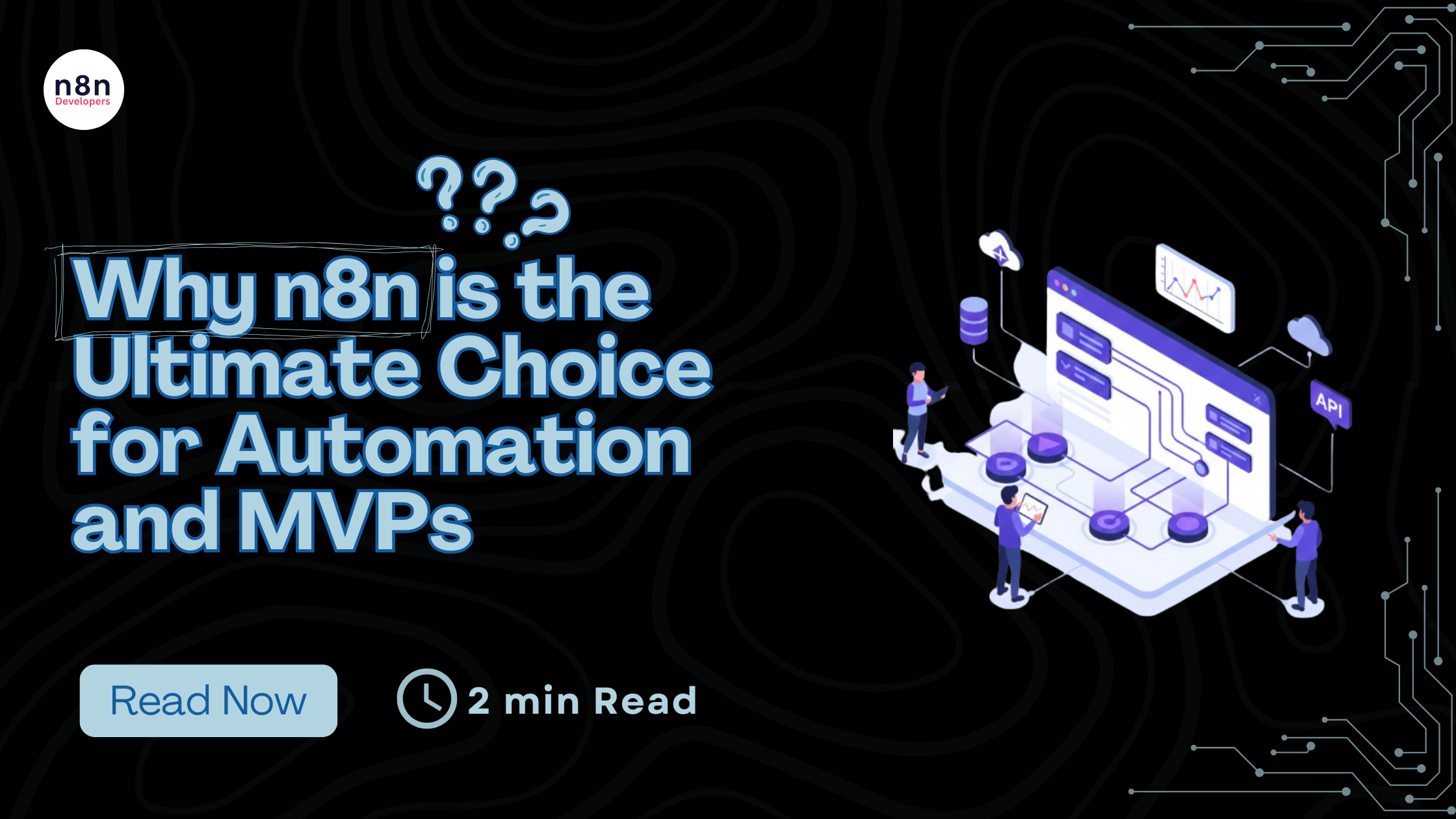
    Why n8n is the Ultimate Choice for Automation and MVPs

    If you’ve spent any time in the startup world lately, you know the “speed vs. stability” trade-off is real. n8n When you’re trying to launch a Minimum Viable Product (MVP), every hour spent writing boilerplate code for an API integration is an hour you aren’t talking to customers. But here’s the kicker: if you rely too much on “no-code” tools to save time, you eventually hit a wall where the tool just won’t do what you need.

    This is exactly why n8n automation has become the go-to for technical founders. It doesn’t treat you like a beginner. It treats you like an engineer who wants to move fast. Hire n8n developers If you’re looking to build something that actually scales, you don’t just need a tool; you need a strategy—and often, you need to who know how to wire these systems together for the long haul.

    The “Fair-Code” Advantage: Visual Logic, No Limits

    The problem with most automation platforms is that they are “black boxes.” You put data in, something happens in the middle, and data comes out. But what happens when you need to perform a complex data transformation that isn’t in a dropdown menu? In most apps, you’re stuck.

    n8n uses a “fair-code” philosophy.1 It’s node-based, so you can see your workflow automation visually—which is great for debugging and mental mapping.2 But the “secret sauce” is that every node allows you to peek under the hood. Need to write a custom JavaScript snippet to parse a messy JSON response? Just open a Code Node. Want to run a Python script to handle some data science logic? Go for it. It bridges the gap between the simplicity of no-code and the raw power of a custom backend.

    Why n8n is an MVP’s Best Friend

    When you are in the MVP development phase, you have two major enemies: burning through your cash and taking too long to ship.

    1. Killing the “Success Tax”

    Most cloud automation tools use a “per-task” pricing model. This is essentially a tax on your growth. If your product goes viral and you trigger 100,000 workflows, your bill could jump from $\$20$ to $\$2,000$ overnight. By choosing self-hosted automation, you run n8n on your own infrastructure (like a simple Digital Ocean droplet or AWS instance).3 Your cost is flat. Whether you run ten tasks or ten million, the price doesn’t change. This predictability is vital for a lean startup.

    2. The Instant Low-Code Backend

    Building a traditional backend with Express or Django takes time. You have to set up servers, manage routes, and handle auth. For many MVPs, n8n can be your backend. It can receive webhooks from your frontend, talk to your database (Postgres, Supabase, Airtable), and send out transactional emails. It essentially functions as a low-code backend that you can modify in real-time without a full redeploy.

    3. AI is No Longer an Add-on

    In 2026, if your MVP doesn’t have an AI component, you’re already behind. n8n has arguably the best AI orchestration nodes on the market. Using LangChain, you can build autonomous agents that don’t just follow a path, but actually “think” and make decisions based on your data. This isn’t just simple chatbot stuff; it’s deep workflow automation that can transform how your business operates.

    Scaling: Why Architecture Matters

    I’ve seen plenty of founders try to build these workflows themselves, only to end up with “spaghetti logic” that breaks the moment a user enters an unexpected string. This is the point where smart teams decide to Hire n8n developers.

    A pro doesn’t just drag nodes; they architect for failure. They build “Error Trigger” flows that catch timeouts. They use global variables to make sure your API keys aren’t hardcoded. They ensure that your n8n instance is Dockerized and backed up. Essentially, they turn a “cool tool” into a production-grade infrastructure.

    The Solve: One Side Image, One Side Code

    Visualizing n8n is easy if you think of it as a split brain. On the “Image” side, you have a beautiful, clean canvas where nodes represent your business logic—”Customer Pays,” “Update CRM,” “Send Welcome Email.” On the “Solve” side, you have the raw technical reality: JSON objects, API headers, and custom scripts that ensure the data is perfect. This duality is what makes it the best platform for building modern software.

    Final Thoughts

    Stop wasting time reinventing the wheel. If you’re building an MVP, you need to focus on your unique value proposition, not on how to sync a Google Sheet with a Discord bot. Use n8n automation to handle the heavy lifting of your integrations. It’s faster, it’s cheaper, and it gives you the professional control that no-code tools simply can’t match.

  • Mastering Enterprise Governance: A Deep Dive into n8n’s New Security Controls

    Scaling automation across an enterprise requires more than just powerful workflows; it requires robust governance. Without proper controls, a weak permission model can jeopardize compliance, introduce data risks, or disrupt execution volume.

    To address these challenges, n8n has introduced Custom Project Roles and SSO User Provisioning. These features are designed to provide instance owners with confidence and technical teams with the flexibility they need to scale safely.

    Below, we answer the most critical questions about how these features work and how they solve common enterprise governance problems.

    Why is granular control necessary for scaling automation teams?

    As organizations roll out n8n across multiple departments—such as developers, analysts, operations, and external contractors—simple access models often fall short. You need guardrails to ensure that users can only access the specific resources they are supposed to.

    In the past, teams often faced the problem of “over-permissioning,” where a user was granted full administrative access simply because they needed to perform one specific task. This lack of granular control posed a security risk. With the new controls, you can model the software around your actual team responsibilities, ensuring users have exactly the access they need and nothing more.

    How do Custom Project Roles differ from standard System Roles?

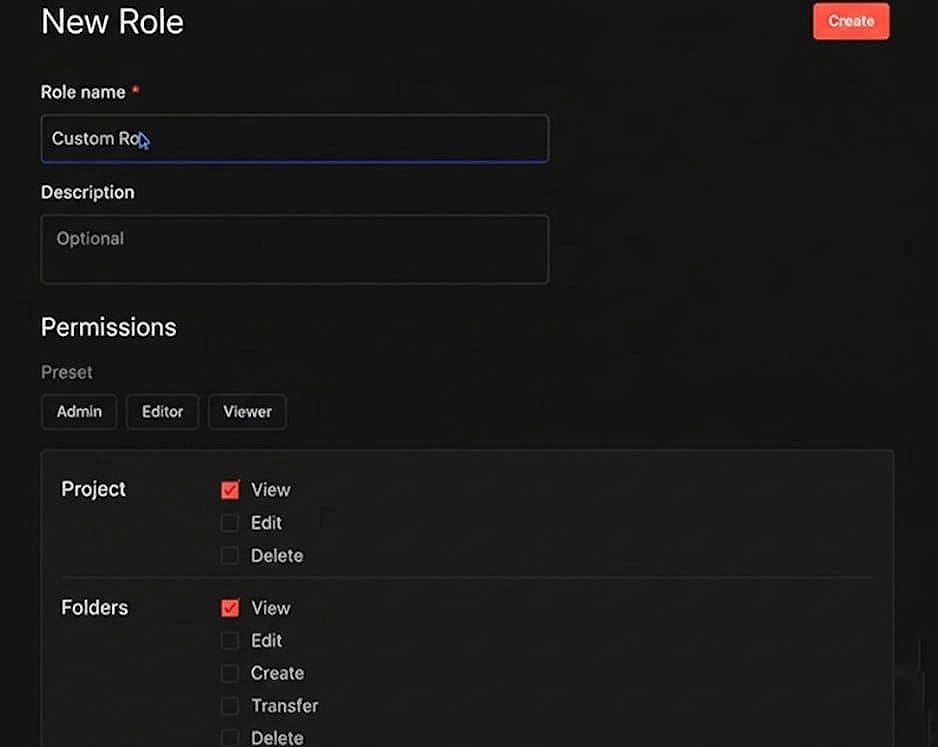
    n8n comes with default “System” roles. These are labeled as such and cannot be edited or deleted.

    Custom Project Roles, however, allow you to define a new, specific set of permissions that fit your unique workflows. Once you create a custom role, it becomes a reusable template that can be applied across all your projects. This ensures consistency; you can use the same role definitions multiple times, and if permissions need to change, you only need to adjust that singular role definition.

    (The “New Role” interface where you can name your custom role and begin defining permissions.)

    What specific resources can be managed with Custom Project Roles?

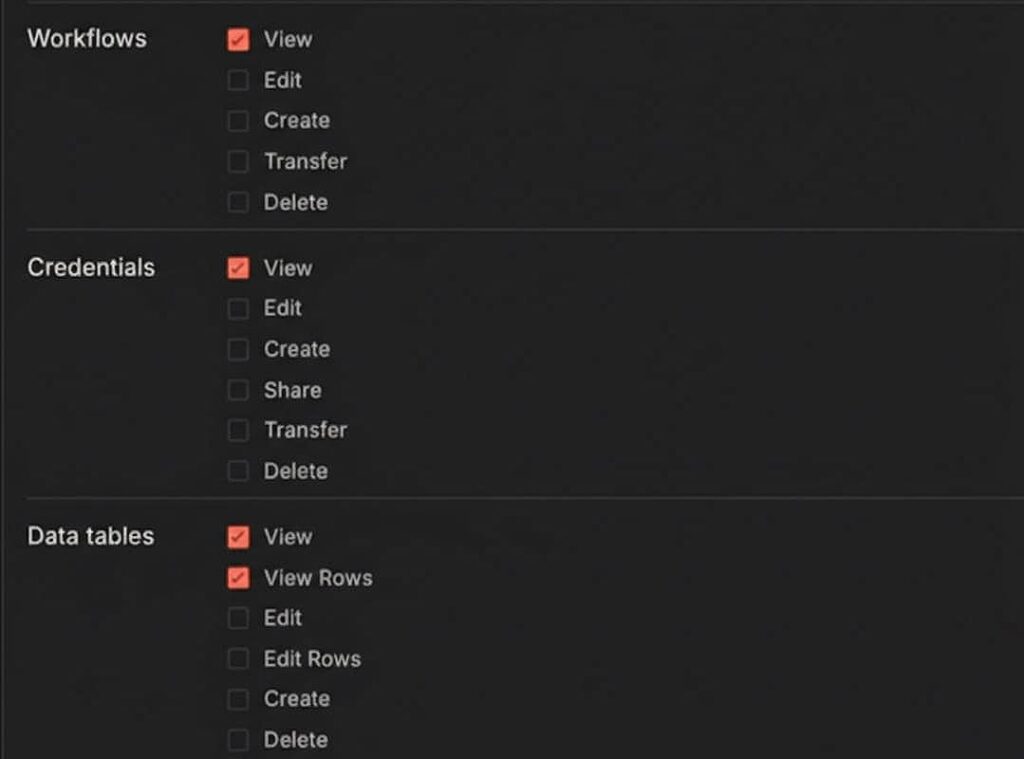
    The new system offers fine-grained control over every resource inside a project. You can independently set permissions for:

    • Workflows

    • Credentials

    • Data tables and variables

    • Folders

    • Source control.

    For each of these resources, you can specify exactly what action a user can take: view, create, edit, delete, or transfer.

    (Granular permission settings allow you to check specific boxes for Workflows, Credentials, and Data tables independently.)

    This allows for highly specific role definitions. For example, you can create a “Builder” role that can create and edit workflows but cannot manage credentials. Alternatively, you could create an “Approver” role that can push changes to production but cannot edit the workflows themselves.

    How does SSO User Provisioning simplify onboarding?

    Managing user accounts manually is a significant administrative burden. SSO User Provisioning automates this process using standard protocols like SAML or OIDC.

    When a user logs in through your Identity Provider (IDP) for the first time, their account is automatically created in n8n. This eliminates the need for administrators to manually add every new user.

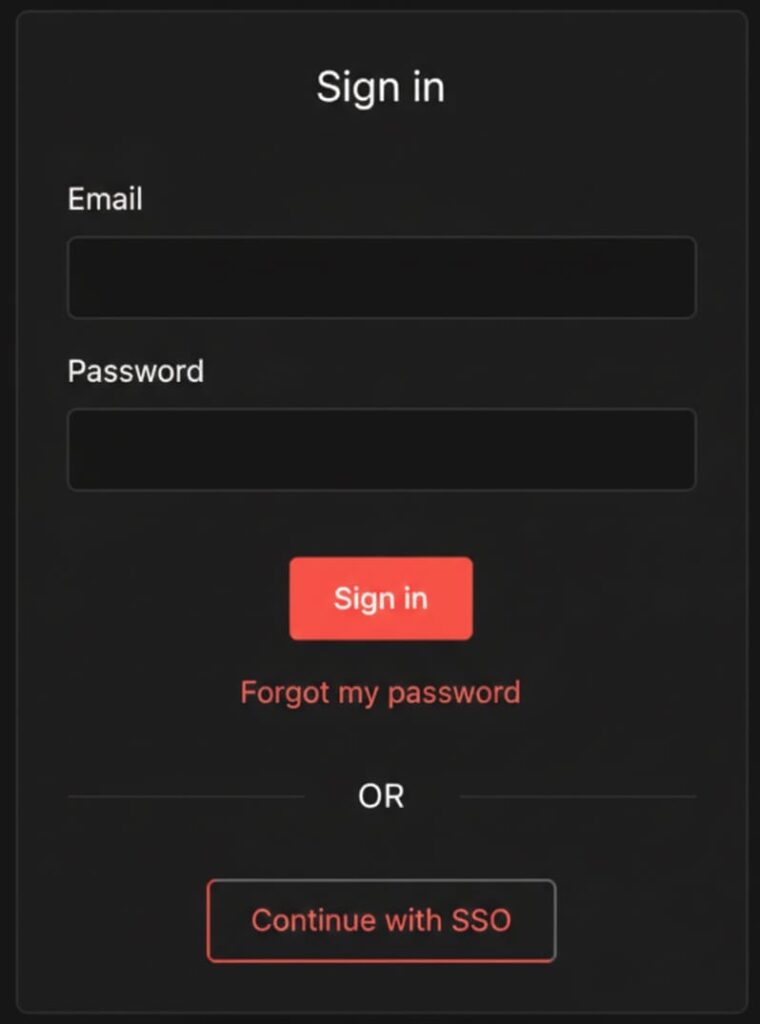
    (The login screen featuring the “Continue with SSO” button, streamlining user access.)

    More importantly, role assignment is integrated into this process. Roles can be assigned immediately upon the first login based on attributes from your IDP. For instance, a user belonging to the “Engineering Group” in your central system can automatically be assigned the “Developer Role” within n8n.

    Can the Identity Provider manage permissions at the project level?

    Yes. In the Settings > SSO menu, you can configure the level of control your IDP has over user roles. There are three primary options:

    1. n8n Managed: User roles are handled manually within the platform.

    2. Instance Role: Your IDP manages the global instance-level access.

    3. Instance & Project Roles: Your IDP manages permissions down to the specific project level.

    This flexibility reduces administrative overhead significantly. In the past, teams might have had to build complex n8n workflows just to synchronize users and roles; now, that capability is built directly into the platform.

    What is the protocol for deleting a Custom Role?

    To ensure stability, n8n prevents you from deleting a role that is currently in use. If you attempt to delete a custom role that has users assigned to it, the system will block the action.

    To successfully delete a role, you must first navigate to your project settings and remove or reassign any users currently attached to that role. Once the role has zero users assigned, it can be safely deleted.

    Summary: The Governance Stack

    These features—Custom Project Roles and SSO User Provisioning—operate together to form a comprehensive “governance stack”.

    Role Control ensures precise permissions.

    Identity Control ensures secure authentication.

    Behavior Control ensures safe execution.

    If security concerns have previously hindered your ability to roll out n8n across your enterprise, these controls provide the clarity and safety required to let automation grow.

  • Why Tech Teams Prefer to Hire N8N Developers Over Zapier or Make Specialists

    Why Tech Teams Prefer to Hire N8N Developers Over Zapier or Make Specialists

    Businesses today depend on automation to run faster, reduce manual work, and connect multiple tools without friction. While platforms like Zapier and Make.com have dominated the market in the past, tech teams are increasingly choosing to Hire N8N Developers for deeper control, flexibility, and cost efficiency.

    N8N has established itself as a powerful open-source automation platform, offering features that suit companies with growing automation demands. Here’s why N8N developers are becoming the preferred choice over Zapier and Make specialists.

    1. Full Customization and Unlimited Flexibility

    Zapier and Make are easy, but they have restrictions on advanced logic, branching, and backend-like operations. N8N, however, is completely flexible—allowing developers to create workflows exactly the way the business needs.

    An N8N developer can write JavaScript anywhere inside the workflow, build custom nodes, and even integrate private APIs seamlessly.

    Example: A Simple N8N Code Node Snippet

    // Example: Transforming incoming data in N8N

    const user = {

    name: $json.name,

    email: $json.email,

    status: “active”,

    };

    return [{ json: user }];

    This level of coding control is just not possible inside Zapier or Make.

    2. Cost Efficiency—No More Paying per Task or Operation

    Zapier and Make charge based on:

    • Number of tasks
    • Number of operations
    • Workflow complexity

    This becomes extremely costly for fast-growing teams.

    N8N is self-hostable and free, and companies only pay for:

    • Hosting
    • Developer time

    Tech teams prefer to Hire N8N Developers because this approach dramatically reduces automation costs as the business scales.

    3. Self-Hosting = Data Privacy + Security

    Many industries cannot use Zapier or Make due to compliance needs (finance, healthcare, legal, government).

    N8N allows:

    • Full self-hosting
    • Local execution
    • Data never leaving the company’s server
    • Custom access control

    This is a massive advantage for enterprises.

    4. Build Complex Workflows That Zapier/Make Cannot Handle

    N8N developers can create:

    • Multi-branch workflows
    • Complex API sequences
    • Conditional logic
    • Real backend-like automation
    • Custom-built nodes
    • Internal service orchestration

    This makes N8N the preferred platform for companies scaling automation beyond simple triggers.

    5. Better Integration with DevOps & Engineering Teams

    Developers love N8N because:

    • Workflows can be version-controlled
    • JSON-based structures fit perfectly into Git
    • CI/CD pipelines can automate deployment
    • It behaves like a real engineering tool
    • It supports containerization with Docker

    Technical teams prefer a system that behaves like software—not like a drag-and-drop consumer tool.

    6. Future-Proofing the Automation Infrastructure

    Zapier or Make specialists are restricted by the platform’s limitations.

    But when companies Hire N8N Developers, they gain access to:

    • Custom API connectors
    • Direct database operations
    • Logic-driven processing
    • Background workers
    • Serverless execution support
    • Dynamic scripting

    This ensures the automation system can evolve with business demands instead of being locked inside a limited SaaS tool.

    7. One N8N Developer Can Replace Multiple Zapier/Make Operators

    A skilled N8N developer can:

    • Develop backend-like logic
    • Create reusable custom nodes
    • Build integrations from scratch
    • Optimize workflows for speed
    • Reduce recurring automation costs

    Zapier and Make specialists often need multiple tools to handle the same complexity level.

    If your business needs deeper automation, custom integrations, and scalable workflow architecture, choosing to Hire N8N Developers is the smart long-term decision.

    They bring engineering-level automation abilities that no-code Zapier or Make specialists simply cannot match.

    N8N is transforming how companies automate—and N8N developers are becoming the new go-to experts for tech teams.

  • Inside Sandeep’s Most Impactful Automations

    Inside Sandeep’s Most Impactful Automations

    Meet the Developer

    Meet Sandeep Patharkar, an AI automation architect and n8n specialist who has trained over 10,000 professionals and works on building production-grade AI automation systems. Through Fast Track AI Mastery, Sandeep focuses on orchestration, AI agents, and scalable automation patterns that go beyond simple workflows. He’s especially interested in how n8n can act as the “control plane” for modern AI systems.

    The Problem That Sparked It All

    Early in his work with automation, Sandeep noticed that many teams could build demos quickly but struggled to keep workflows reliable once they hit real-world complexity. Manual fixes, silent failures, and brittle logic were common. That gap between “it works once” and “it works every day” pushed him to focus on automation as a system, not just a sequence of steps.

    Top 5 Workflows Built by Sandeep

    NosWorkflowWhat It DoesImpact
    1️⃣AI Intake & RoutingRoutes incoming requests to the right AI agents and workflows using n8nReduced manual triage by ~70%
    2️⃣AI Agent OrchestrationCoordinates multiple AI agents with retries, fallbacks, and context handlingImproved response reliability
    3️⃣Error Monitoring & RecoveryDetects workflow failures and triggers automated recovery pathsCut downtime significantly
    4️⃣Knowledge Sync PipelineKeeps vector stores and internal knowledge bases in syncPrevented stale AI responses
    5️⃣Reporting & Observability FlowAggregates logs, metrics, and summaries into a single viewFaster debugging and audits

    Impact Beyond Workflows

    What started as building automations turned into a mindset shift. Instead of asking “Can this be automated?”, Sandeep now asks “How does this behave at scale, under failure, and over time?” The most rewarding moments come when teams realize that automation isn’t just about saving time — it’s about designing systems they can trust.

    Connect with Sandeep

    You can explore Sandeep’s work on production-grade AI automation and n8n orchestration at
    Fast Track AI Mastery

    Good automation isn’t about fewer clicks — it’s about fewer surprises.

    Ready to work with Sandeep? Book a call through n8ndevelopers!

  • n8n for Technical Teams vs No-Code Tools — When Should You Pick n8n?

    n8n for Technical Teams vs No-Code Tools — When Should You Pick n8n?

    Workflow automation has become essential for modern businesses, but choosing the right platform can be challenging. While no-code tools promise speed and simplicity, platforms like n8n for technical teams offer flexibility and control that many engineering-led organizations need. So, when does it make sense to choose n8n over popular no-code automation tools?

    This guide breaks down the pros, cons, trade-offs, and ideal use cases to help you make a confident decision.

    Understanding the Difference: n8n vs No-Code Tools

    No-code tools are designed for non-technical users who want quick automation without writing code. n8n, on the other hand, is an open-source workflow automation platform built with developers and technical teams in mind.

    The core difference lies in control vs convenience.

    Why Technical Teams Choose n8n for Technical Teams

    • Developer-Level Flexibility

    Unlike rigid no-code platforms, n8n for technical teams allows custom JavaScript, advanced logic, conditional workflows, and direct API handling.

    Key benefits:

    • Write custom code when needed
    • Handle complex data transformations
    • Build workflows that scale with your product
    • Open-Source and Self-Hosted Control

    n8n can be self-hosted, giving teams full control over infrastructure, security, and data privacy.

    Ideal for teams that:

    • Handle sensitive or regulated data
    • Need on-prem or private cloud deployment
    • Want to avoid vendor lock-in
    • Cost Efficiency at Scale

    Many no-code tools charge per task, workflow, or execution. For high-volume automation, costs can rise quickly.

    With n8n for technical teams, you can:

    • Run unlimited workflows on self-hosted setups
    • Control infrastructure costs
    • Avoid expensive per-task pricing

    Trade-Offs to Consider Before Choosing n8n

    • Higher Learning Curve

    n8n is not purely drag-and-drop for beginners. Technical understanding is required.

    Trade-off:

    • More setup time
    • Requires developer involvement
    • Less suitable for non-technical users
    • Maintenance Responsibility

    Self-hosting means your team handles updates, monitoring, and scaling.

    Ask yourself:

    • Do we have DevOps support?
    • Are we comfortable managing servers?

    If yes, n8n for technical teams becomes a strong advantage.

    When No-Code Tools Are the Better Choice

    No-code tools still have their place.

    They are ideal when:

    • Non-technical teams build simple automations
    • Speed matters more than flexibility
    • Workflows are low-volume and linear

    For marketing, sales, or HR teams, no-code platforms often deliver faster results.

    Who Is n8n for Technical Teams Really For?

    n8n is best suited for:

    • Engineering teams
    • SaaS companies
    • DevOps and platform teams
    • Startups building internal tools
    • Enterprises with compliance requirements

    If your workflows require logic, APIs, custom scripts, or long-term scalability, n8n for technical teams is a smart investment.

    n8n vs No-Code Tools: Quick Comparison

    Choose n8n if you need:

    • Advanced logic and custom code
    • Full data ownership
    • Predictable costs at scale
    • Open-source flexibility

    Choose no-code tools if you want:

    • Instant setup
    • Minimal technical involvement
    • Simple, short workflows

    When Should You Pick n8n?

    Pick n8n when automation is part of your core infrastructure—not just a productivity hack. While no-code tools are great for quick wins, n8n shines when reliability, scalability, and customization matter.

    For teams that think long-term and build complex systems, n8n isn’t just a tool—it’s a foundation.

  • Why You Must Hire N8N Developers to Automate Data Workflows

    Why You Must Hire N8N Developers to Automate Data Workflows

    If you’re looking for a smarter, customizable, and cost-effective automation solution, hiring experts who specialise in N8N is the easiest way to transform your business operations. When you choose to Hire N8N Developers, you’re not just bringing someone on board to build automation—you’re adding an expert who understands how to connect systems, sync data, reduce manual work, and improve operational efficiency using one of the most powerful open-source automation tools in the world: N8N.

    Automation is no longer optional. Businesses today deal with huge volumes of data and scattered tools that must communicate with each other to stay competitive. And that is exactly where N8N workflow automation comes in. With the right developer, you can automate complex tasks, integrate apps, manage data pipelines, and create advanced workflows that run smoothly in the background 24/7.

    What Is N8N and Why Is It So Powerful for Data Automation?

    N8N is an open-source, low-code automation tool designed to integrate apps, connect APIs, manipulate data, and trigger workflows across your business applications. It’s often compared to Zapier or Make, but far more flexible and developer-friendly.

    What Makes N8N Stand Out?

    • Open-source freedom (self-host and customise everything)
    • Unlimited workflows without expensive subscription limits
    • Supports 300+ integrations
    • Builds complex logic using conditional routes, code nodes, and custom triggers
    • Perfect for large-scale data automation

    Because of these capabilities, companies in eCommerce, SaaS, healthcare, fintech, logistics, and digital agencies increasingly choose to Hire N8N Developers to automate everything from CRM updates to payment processes.

    Why Your Business Needs N8N Workflow Automation

    Automated workflows drastically cut down manual work, human errors, and operational costs. With N8N, your business can streamline:

    • Customer onboarding
    • CRM & database syncing
    • Sales pipeline updates
    • Data cleansing & migrations
    • Lead generation and follow-ups
    • Social media automation
    • Financial reporting
    • API-based integrations
    • Email marketing automation
    • Inventory & order management

    By hiring an expert, you unlock the full potential of these capabilities.

    Top Benefits When You Hire N8N Developers

    When you bring an experienced automation developer into your team, **Hire N8N Developers** you gain more than just automation builds—you gain strategic optimization.

    • Custom Workflow Creation

    They build data workflows that match your business structure, not the other way around.

    • Advanced API Integrations

    N8N developers can create custom nodes and connect any API, even if it’s not available out of the box.

    • Real-Time Data Synchronization

    Stop relying on spreadsheets. Automated syncing ensures your data stays accurate across systems.

    • Scalability & Optimization

    Your workflows grow as your business grows. Developers optimize workflows for speed and performance.

    • Reduced Operational Costs

    Hiring one automation expert can eliminate hundreds of hours of manual labor each month.

    Tasks an N8N Developer Can Automate for You

    An experienced N8N engineer can automate dozens of processes across multiple departments.

    Marketing Automation

    • Auto-send leads to CRM
    • Sync contacts with email platforms
    • Automate newsletters
    • Trigger personalised campaigns

    Sales Automation

    • Pipeline updates
    • Meeting scheduling
    • Proposal follow-ups
    • Sales notifications

    Data Management

    • Data transformation
    • ETL processes
    • Database syncing
    • Google Sheets automation

    Ecommerce Automation

    • Order notifications
    • Inventory syncing
    • Shipment updates
    • Customer follow-ups

    DevOps & IT Automation

    • Server monitoring
    • API health checks
    • Alerts & performance tracking

    When you Hire N8N Developers, you remove repetitive tasks and replace them with automated workflows that run flawlessly.

    Essential Skills to Look for Before You Hire N8N Developers

    To hire the right N8N automation expert, make sure they have these skills:

    • Expertise in JavaScript, Typescript & Node.js
    • Deep understanding of REST & GraphQL APIs
    • Experience with database systems (MySQL, MongoDB, PostgreSQL)
    • Strong knowledge of automation logic and trigger-based workflows
    • Ability to create custom N8N nodes
    • Understanding of Docker, cloud servers, and deployment
    • Problem-solving and debugging skills
    • Experience in secure automation practices

    The right developer doesn’t just automate workflows—they make them intelligent.

    Where to Hire N8N Developers for Workflow Automation

    There are multiple platforms where you can find professional N8N automation experts, including:

    • N8N Community Forum

    A great place to find developers who actively contribute.

    • Freelance Platforms
    • Upwork
    • Fiverr
    • Toptal
    • PeoplePerHour
    • Automation Agencies

    Specialized agencies provide certified N8N experts with proven experience.

    • LinkedIn & Professional Networks

    Perfect for long-term full-time role hiring.

    • N8N Developer Marketplaces

    These exclusive platforms connect you only with verified talent.

    How to Choose the Right N8N Developer

    Before hiring, evaluate the developer on these criteria:

    Portfolio of previous N8N workflows

    Knowledge of API integrations

    Ability to build custom nodes

    Understanding of your business workflow Clear communication skills

    Post-deployment support availability

    Common Mistakes to Avoid When Hiring N8N Developers

    Avoid these mistakes to ensure successful automation:

    • Hiring someone with no experience in data workflow automation
    • Ignoring security best practices
    • Not discussing scaling and future expansion
    • Choosing developers based only on cost
    • No clear documentation reques

    Why N8N Is the Future of Business Automation

    N8N stands out because it bridges the gap between low-code simplicity and full-code flexibility. It’s open-source, scalable, and can be customized for any industry.

    The future belongs to businesses that automate. And hiring an expert ensures you stay ahead.

    Automation is the backbone of modern business success, and N8N is one of the most flexible platforms to achieve it. When you Hire N8N Developers, you get a specialist who understands how to automate data workflows, connect applications, optimize processes, and build systems that works.

    From reducing manual tasks to improving data accuracy and boosting productivity, an N8N developer brings immense value to any organization. Whether you’re a startup, agency, or enterprise, investing in workflow automation is a smart move—and hiring the right expert makes all the difference.

    If you’re ready to transform your business operations, now is the time to hire top-tier N8N talent and unlock the full power of automation.

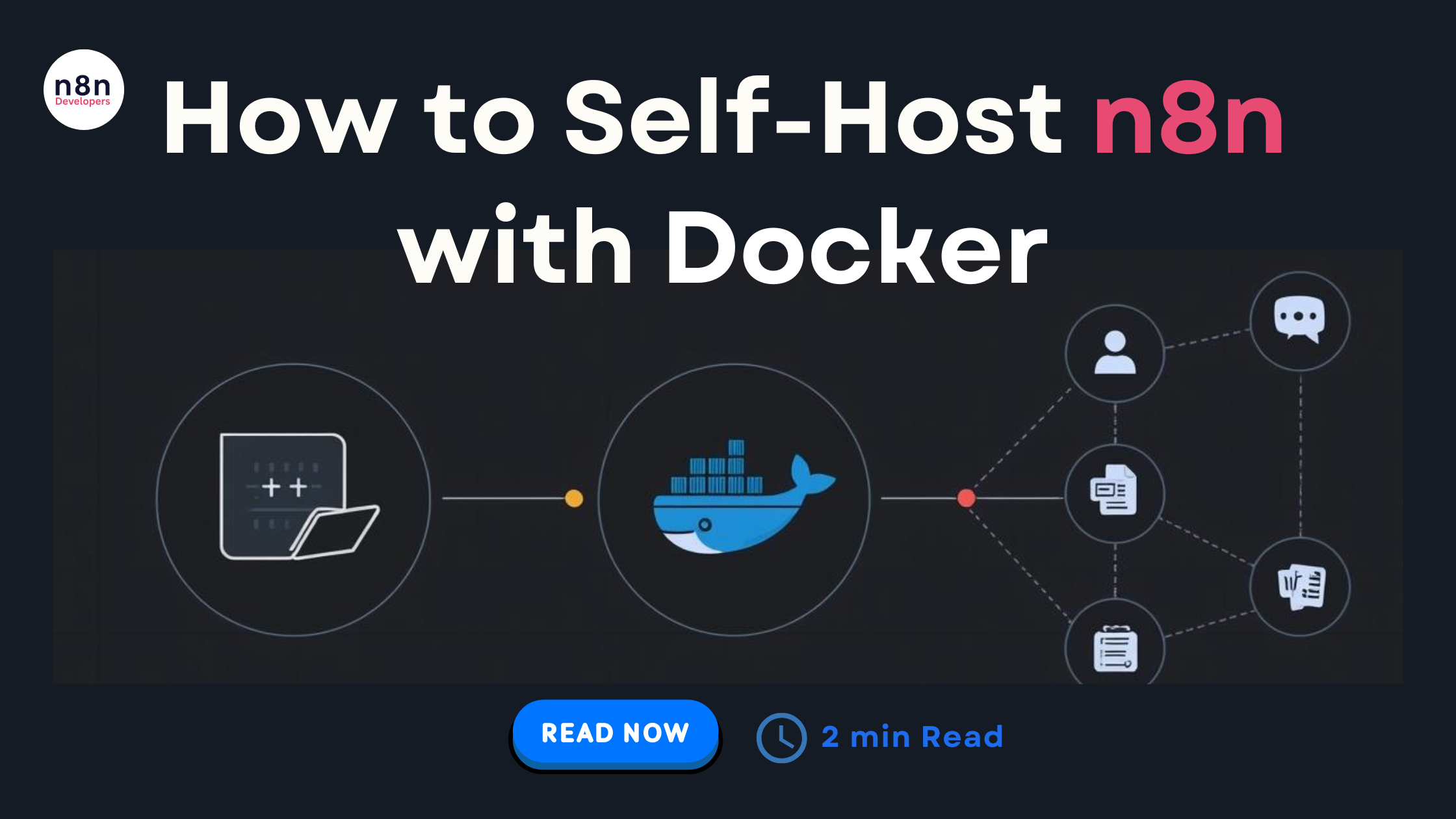
  • How to Self-Host n8n with Docker: The Complete 2026 Guide

    How to Self-Host n8n with Docker: The Complete 2026 Guide

    If you’re planning to automate workflows efficiently in 2026, one of the best decisions you can make is to Self-Host n8n with Docker. n8n has become a go-to automation and workflow orchestration platform for developers, SaaS owners, agencies, and tech teams. And thanks to Docker, running it on your own server is now easier, faster, and more secure than ever.

    This in-depth 2026 guide will walk you through everything: installing Docker, running n8n, configuring environment variables, securing your setup, enabling backups, scaling, connecting databases, and long-term maintenance best practices. Whether you’re hosting on a VPS, cloud provider, or bare-metal server, this guide will help you launch a stable, production-ready n8n instance.

    Why Self-Host n8n in 2026?

    While n8n.cloud is great for quick setups, self-hosting offers major advantages:

    • Full data control & privacy
    • Unlimited workflows
    • Scalable infrastructure
    • Lower long-term operational cost
    • Ability to customize and integrate deeply
    • Freedom to use your own database and storage

    And best of all — Docker makes everything portable, consistent, and easy to manage.

    1. Prerequisites Before You Self-Host n8n with Docker

    Before deploying, make sure your system is ready:

    ✔ Server Requirements

    • Minimum 2 GB RAM
    • At least 1 CPU
    • 10 GB storage (more recommended for execution logs)

    ✔ Install Required Packages

    • Make sure your OS is updated:

    sudo apt update && sudo apt upgrade -y

    • Install Docker:

    curl -fsSL https://get.docker.com | sudo sh

    • Install Docker Compose:

    sudo apt install docker-compose -y

    • After installation:

    docker –version

    docker-compose –version

    If both commands return versions, you’re good to go.

    1. Creating Your n8n Docker Project
    • Create a directory:

    mkdir n8n-docker

    cd n8n-docker

    Now create your docker-compose.yml file.

    1. The Best 2026 docker-compose.yml for n8n
    • Here is the most stable and updated configuration for production in 2026:

    version: ‘3.8’

    services:

    n8n:

    image: n8nio/n8n:latest

    restart: always

    ports:

    • “5678:5678”

    environment:

    • N8N_HOST=your-domain.com
    • N8N_PORT=5678
    • N8N_PROTOCOL=https
    • GENERIC_TIMEZONE=Asia/Kolkata
    • DB_TYPE=postgresdb
    • DB_POSTGRESDB_HOST=postgres
    • DB_POSTGRESDB_PORT=5432
    • DB_POSTGRESDB_USER=n8n
    • DB_POSTGRESDB_PASSWORD=password123
    • DB_POSTGRESDB_DATABASE=n8n
    • NODE_ENV=production

    volumes:

    • n8n_data:/home/node/.n8n

    postgres:

    image: postgres:15

    restart: always

    environment:

    • POSTGRES_USER=n8n
    • POSTGRES_PASSWORD=password123
    • POSTGRES_DB=n8n

    volumes:

    • postgres_data:/var/lib/postgresql/data

    volumes:

    n8n_data:

    postgres_data:

    1. Start n8n with Docker
    • Run this command inside your directory:

    docker-compose up -d

    • Now open your browser:

    http://your-server-ip:5678

    Congratulations! You officially Self-Host n8n with Docker successfully.

    1. Configuring Important n8n Environment Variables (2026 Best Practices)

    To make your setup scalable and production-safe, the following variables are recommended:

    • Security

    N8N_BASIC_AUTH_ACTIVE=true

    N8N_BASIC_AUTH_USER=admin

    N8N_BASIC_AUTH_PASSWORD=yourStrongPassword

    • Workflow Execution History

    EXECUTIONS_DATA_SAVE_ON_SUCCESS=none

    EXECUTIONS_DATA_SAVE_ON_ERROR=all

    • Webhook URL Settings

    WEBHOOK_URL=https://your-domain.com/

    1. Setting Up SSL (HTTPS) for n8n

    Use Nginx Proxy Manager or Caddy for automatic SSL.

    ✔ Option 1: Caddy (Best for 2026)

    Create Caddyfile:

    your-domain.com {

    reverse_proxy localhost:5678

    }

    Caddy fetches SSL certificates automatically.

    1. Connecting n8n to External Storage (Optional)
    • Amazon S3 / Minio (recommended for large automation setups)

    EXECUTIONS_MODE=queue

    EXECUTIONS_DATA_PRUNE=true

    1. Setting Up Backups for n8n

    Use Docker volumes for persistent storage:

    • Backup n8n:

    docker run –rm -v n8n_data:/data -v $(pwd):/backup alpine tar czvf /backup/n8n_backup.tar.gz /data

    Backup PostgreSQL:

    docker exec -t postgres pg_dumpall -c -U n8n > postgres_backup.sql

    1. Scaling n8n in 2026

    For large workflows:

    • Enable queue mode:

    EXECUTIONS_MODE=queue

    • Deploy Redis:

    redis:

    image: redis:7

    Then add worker containers to scale horizontally.

    1. Keeping Your n8n Updated in 2026

    Update n8n safely:

    docker-compose pull

    docker-compose down

    docker-compose up -d

    Updates usually take 30 seconds.

    1. Common Issues & Fixes
    • n8n not starting
    • Check logs:

    docker logs n8n

    Database connection issues

    Ensure PostgreSQL container is running:

    docker ps

    SSL problems

    • Confirm DNS is pointing correctly
    • Restart proxy service
    1. Best Practices for Self-Hosting n8n in 2026
    • Always run n8n behind a reverse proxy
    • Use PostgreSQL (never SQLite for production)
    • Enable basic auth
    • Use strong passwords
    • Set up regular backups
    • Keep server updated
    • Run n8n in queue mode for heavy workflows
    • Use domain instead of IP

    If you’re planning to build professional-grade automation workflows, deploying n8n on your own server is one of the smartest moves you can make — and choosing to Self-Host n8n with Docker ensures a secure, scalable, and high-performance environment. With Docker, the setup becomes predictable and portable, allowing you to manage updates, configurations, and scaling with ease.

    By following this complete 2026 guide, you now have everything you need to install, configure, optimize, and maintain your self-hosted n8n instance like a professional DevOps engineer. Whether you’re building automation for your business, SaaS platform, agency, or internal teams, this setup will easily support thousands of workflows and integrations reliably.

  • Comfort’s Five Go-To Workflows for Smarter Operations

    Comfort’s Five Go-To Workflows for Smarter Operations

    Meet the Developer

    Today, we’re spotlighting Comfort Fajugbagbe, an automation specialist based in Lagos, Nigeria, who designs reliable, logic-driven systems using n8n.

    Comfort works with founders, operators, and growing teams that have outgrown manual processes. Her work spans client onboarding workflows, structured Telegram chatbots, and patient reminder systems—each built with a strong focus on clarity, consistency, and long-term scalability.

    Through her approach, Comfort helps teams replace complexity with systems that actually work, allowing them to operate smoothly and grow without friction.

    The Problem That Sparked It All

    I didn’t set out to become an automation expert, I became one because I refused to accept being busy as normal. After working across fragmented tools and repetitive admin, I realized the real problem wasn’t effort, but broken systems. Today, I design thoughtful automation workflows with n8n that help founders and teams regain clarity, structure, and time without losing the human touch.

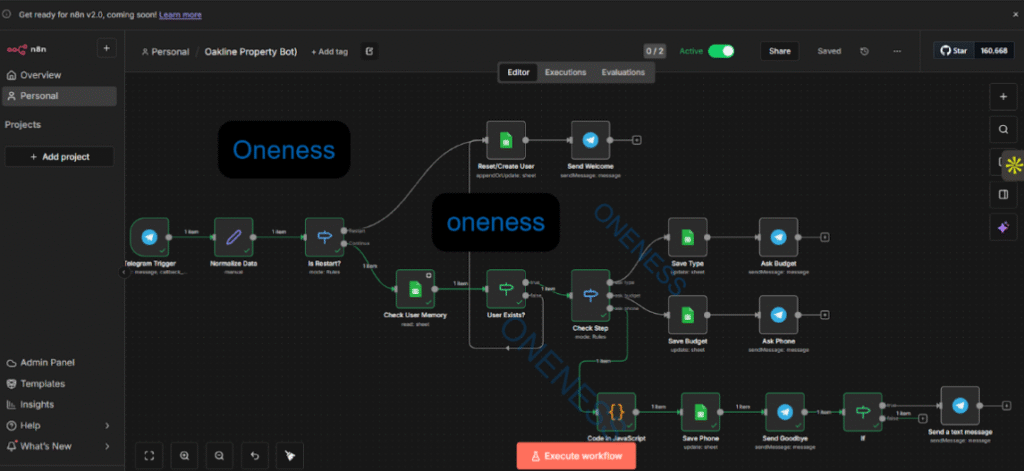
    1. Automated Real Estate Lead Qualification System (n8n)

    Built a logic-driven Telegram chatbot that captures website leads instantly, qualifies them by intent, budget, and timeline, and tags them as hot or cold in a database. High-value buyers trigger real-time priority alerts to agents, while others are logged automatically. The system ensures zero missed leads, instant response times, and fully automated follow-up even while agents are offline.

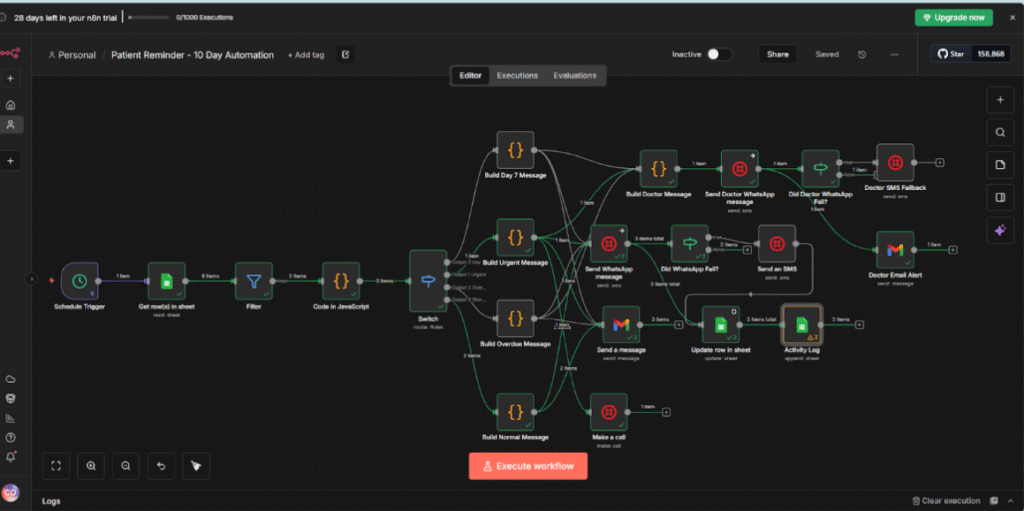
    2. Patient Reminder System – 10-Day Follow-Up Automation

    This workflow automatically monitors patient requests from your Google Sheet and calculates reminder timings. Every minute, it:

    • Checks for pending patient requests
    • Calculates how many days have passed since the request date
    • Determines reminder urgency levels (Normal, Strong, Urgent, Final, or Overdue)
    • Flags patients at Day 7 and Day 9 for special attention
    • Identifies overdue cases (past 10 days)

    This ensures timely patient follow-ups without manual tracking.

    3.End-to-End Voice Agent Automation for Orders and Reservations

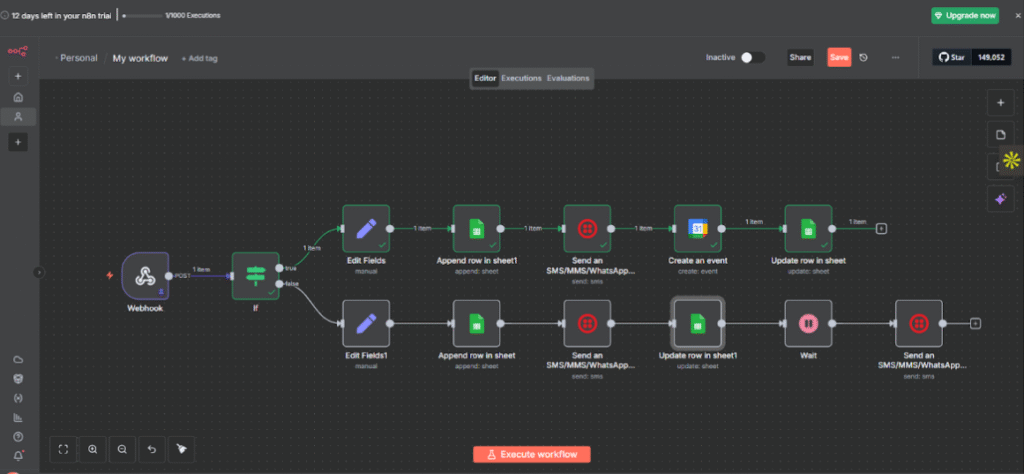
    I built a voice-enabled automation system for restaurants that handles orders and table reservations end to end. Customers speak to an AI voice agent, while n8n processes the data, logs it in Google Sheets, sends WhatsApp confirmations, creates calendar events, and triggers follow-ups automatically. The result is a hands-free system that reduces errors, prevents missed calls, and runs continuously without staff intervention.

    4. Lead-to-Customer Automation System

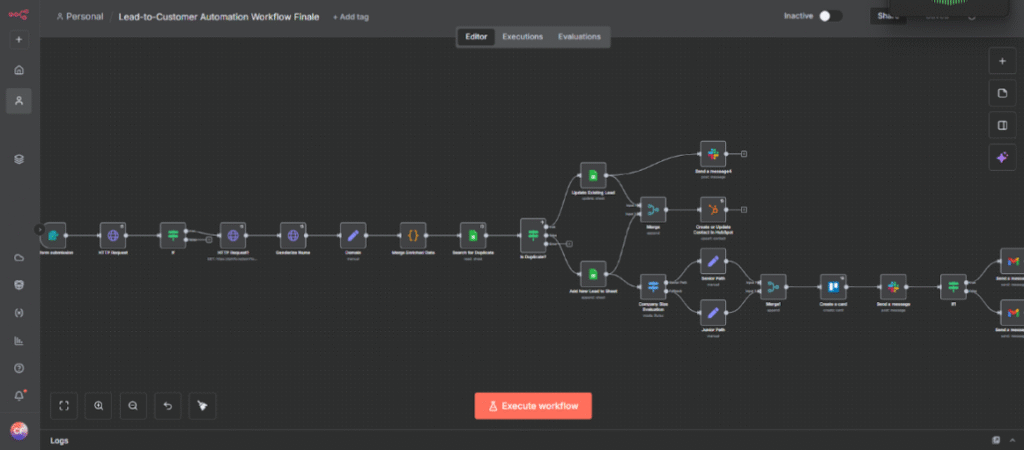
    I built a Lead-to-Customer automation in n8n that captures, validates, enriches, and routes leads automatically. It prevents duplicates, assigns leads based on company size, triggers follow-ups, and logs errors with retry logic for reliability. After multiple rebuilds, the final system eliminated silent failures and ensured no lead was missed, delayed, or mishandled.

    5. Social Media Monitoring & Alerts System

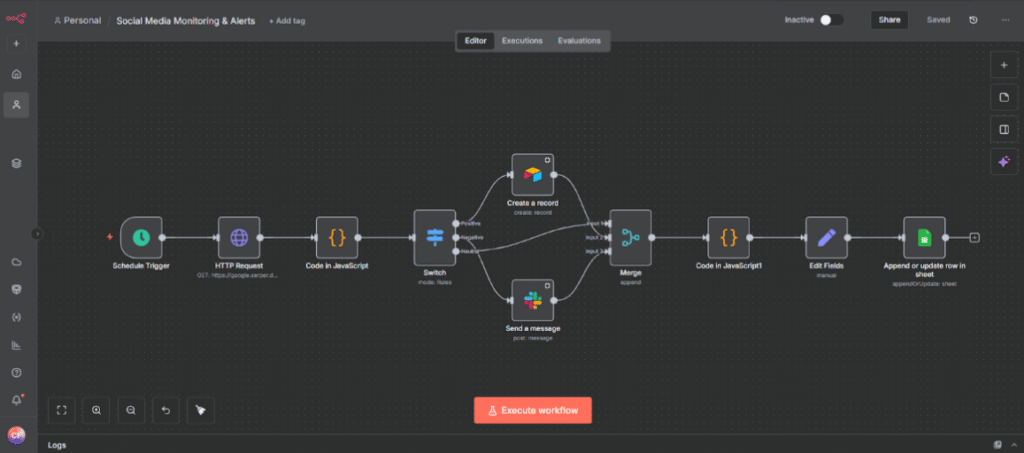
    I built an automated brand intelligence workflow with n8n that monitors real-time brand mentions from Google News, analyzes sentiment using custom JavaScript logic, and routes insights automatically. Negative mentions trigger instant Slack alerts, positive mentions are saved to Airtable, and all data is logged in Google Sheets for long-term analysis—turning brand monitoring into a scalable, cost-effective system.

    Impact Beyond Workflows

    Automation changed the way I think before it changed the way I work. I no longer see busyness as productivity, but as a signal that a system needs to be redesigned. Building with n8n taught me to step back, question defaults, and create workflows that support people instead of exhausting them. The most rewarding part is seeing teams realize they don’t need to work harder, they just need better systems.

    “I build systems so people can focus on what really matters — not just on staying busy.”

    Linkedin: www.linkedin.com/in/comfortfajugbagbe

    Email: comfortfajugbagbe@gmail.com

    Ready to work with Comfort? Book a call through n8ndevelopers!

  • Best Platforms to Hire N8N Developers Online

    Best Platforms to Hire N8N Developers Online

    Best Platforms to Hire N8N Developers Online

    If you’re planning to automate your business workflows, integrate multiple apps, or build smart processes using n8n, you need the right talent to bring everything together smoothly. That’s why many businesses search for the Hire N8N Developers keyword—because hiring skilled automation experts is one of the fastest ways to boost productivity without increasing manual workload.

    Today, there are several trustworthy platforms where you can hire certified, experienced, and project-ready N8N developers. Whether you’re a startup that needs simple workflow automation or an enterprise looking to build a custom automation ecosystem, the right hiring platform can save you time, money, and stress.

    This complete guide will walk you through the best places to hire N8N developers online, along with their advantages, unique features, and tips to choose the perfect automation talent for your business.

    Why Businesses Are Searching for “Best Platforms to Hire N8N Developers Online”

    Before exploring the platforms, let’s understand why hiring N8N developers is becoming a top priority for companies:

    Automation saves time

    Automating repetitive tasks—emails, CRM updates, lead capturing, backend operations—helps teams stay productive.

    Cost-effective compared to full-time hiring

    You can hire project-based N8N developers and avoid long-term employee costs.

    Integrations made easy

    N8N supports 450+ integrations, and a skilled developer can connect your apps effortlessly.

    Scalable automation

    Businesses can start small and expand their automation as they grow.

    Custom workflows

    Developers build tailored workflows based on your internal processes, ensuring accuracy and efficiency.

    Best Platforms to Hire N8N Developers Online

    Here are the top platforms you can trust when you want to Hire N8N Developers who understand automation, integrations, and workflow optimization.

    1. N8NDeveloper.com (Highly Recommended Platform)

    One of the most reliable platforms that focuses only on N8N development and automation services. Since the website is fully dedicated to N8N-based projects, you can easily find specialists for integration, workflow creation, automation architecture, and API-based custom workflows.

    Why Choose This Platform?

    • 100% specialized N8N developers
    • Fast project matching
    • Affordable and transparent pricing
    • Expertise in API, third-party integrations & advanced automation
    • Dedicated support for complex N8N setups

    Best For:

    Businesses that want verified experts instead of general freelancers.

    1. Upwork

    Upwork is one of the largest global freelance marketplaces, where several experienced N8N developers offer hourly or fixed-price services.

    Why Upwork Works Well

    • A wide pool of freelancers from beginner to expert level
    • Flexible pricing
    • Review-based hiring
    • Ability to browse portfolios, previous automation work, and client ratings

    Best For:

    Small to medium-sized companies that want control over freelancer selection and budget.

    2. Fiverr

    Fiverr is great when you want quick, package-based automation services. Many N8N developers on Fiverr offer ready-to-buy services such as:

    • Workflow setup
    • API integration
    • Chatbot & CRM automation
    • Lead management workflows

    Why Fiverr Is a Good Choice

    • Perfect for small tasks
    • Quick delivery options
    • Pre-defined pricing packages
    • Easy-to-use interface

    Best For:

    Businesses that need small N8N tasks completed fast.

    3. Toptal

    Toptal is known for offering the top 3% of global tech talent. If you need a highly experienced N8N developer, architect, or automation engineer, Toptal is a premium platform.

    Why Toptal Stands Out

    • Strict talent screening
    • High-level developers
    • Ideal for enterprise automation setups
    • Seamless project matching

    Best For:

    Enterprises and high-budget companies that want complex automation systems.

    4. GitHub & Open Source Communities

    Many N8N experts actively contribute to GitHub and community groups. You can reach out to contributors, workflow creators, or integration builders who already know the N8N ecosystem deeply.

    Benefits

    • Developers with real-world experience
    • Great for long-term collaboration
    • Get help from people who understand N8N internally

    Best For:

    Technical teams and startups looking for passionate N8N contributors.

    5. LinkedIn

    LinkedIn is a powerful place to find experienced Hire N8N Developers who have worked with automation, workflow tools, and custom integrations. You can check their professional background, certifications, and previous projects.

    Why LinkedIn Works

    • Verified professional identity
    • Direct communication
    • Ideal for hiring full-time or long-term developers
    • Ability to post job openings for N8N-specific skills

    Best For:

    Companies building automation teams or hiring long-term developers.

    Factors to Consider Before Hiring N8N Developers

    Finding the right developer makes a huge difference in your automation success. Keep these factors in mind:

    1. Experience in automation tools

    Prefer developers who have worked on multiple automation platforms (Zapier, Make, Pabbly).

    2. API knowledge

    Since N8N heavily relies on APIs, the developer must understand authentication, endpoints, and JSON structures.

    3. Previous workflow portfolio

    Ask for past workflow samples.

    4. Problem-solving skills

    Automation is not just connecting apps—it’s designing a smart system.

    5. Pricing & availability

    Choose developers who fit your timeline and budget.

    6. Communication

    Clear communication avoids workflow errors and saves time.

    Tips to Successfully Hire N8N Developers

    Here are helpful tips that guarantee a smooth hiring experience:

    • Define your project scope clearly
    • Mention applications that need integration
    • Share workflow diagrams or processes
    • Decide whether you prefer hourly or fixed project rates
    • Ask for a test task if needed
    • Check the developer’s automation logic & coding background
    • Request documentation for workflows

    Hiring the right automation expert can transform your operations. Platforms like Hire N8N Developers, Upwork, Fiverr, and Toptal provide access to talented developers who can help you unlock the full power of N8N.

    Whether you need small workflow fixes or a full automation system, these platforms make it easy to find specialists who understand your business needs.

    If scaling automation is your next step, start exploring these trusted platforms and choose the one that best matches your project goals.

    Frequently Asked Questions (FAQs)